QuestGarden webquest

This assignment was difficult.  I had opted to use a site called questgarden to build my webquest.  It took many times of doing the quest over and over.  My brain refused to remind me to save the page.  Once you made changes, if you moved to another page, your changes would disappear…..Poof gone.  You had to remember to go to the very bottom of the page and click on the mini size button that said save.  Very frustrating.  I was also not able to find a way to link the URL’s for the websites I wanted everyone to go to underneath the pictures so you could just click on the pictures.  I think I would try a different web site to make a webquest in the future.  Here is the link if you want to look at it.

http://questgarden.com/201/06/7/181122172408/

Webquest.PNG

Making Movies

After two weeks of struggling, I was finally able to make a three minute video for a social studies class.  The end result of using free software is having music that does not match the slides and photos you are presenting.  The absolute best part of the final product is the banner across the entire three and a half minutes of the video to shamelessly advertise the free trial version of the software I used.  Heavy sigh.

If I were teaching social studies I think I would be inclined to make some videos with good software that I might be able to show every year on relevant issues.  It would be a great way to spend time over the summer preparing for a new year.  I would of course break down and actually purchase software.   Here is my project.  Enjoy and try not to laugh at the banner…

https://youtu.be/Vqe9Ex1xw5U


Prezi

Over the last two weeks I attempted to use Prezi to show a comparison between three different presentation sites.  (Slideshare, Prezi and Voicepress).  It was a disappointing process as the sites were not as versatile as you might think without upgrading to better versions.  (The free sites are good, but to get the most out of the programs you really need to upgrade).  There are so many tutorials on line it was difficult to find time to look at all the options.  Overall I did like that the sites could be used for students to compile reports in a more creative fashion with videos and pictures.  Attached is the link to see my work.

https://prezi.com/dashboard/next/#/details/ewhvqxwodgg5/

Prezi


Power Point

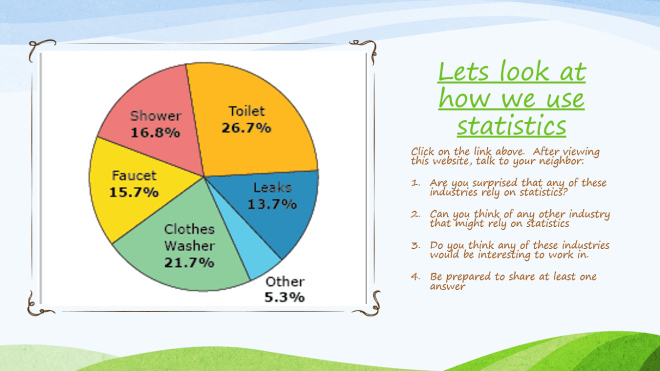
This week we had to compile a power point presentation that would be an engaging way to teach a lesson.  Based on the amount of time it took me to do one presentation it is not something I would do frequently if ever.  I agree that is it good to give students multiple methods of learning.  With that being said, their are many curriculum courses that offer built in videos and games with the printed material.  It seems as though that is a better alternative.  On the other side, I think it is a great way for students to exercise their creativity and show what they know about something.  Of course you would have to keep them on task at the same time.  I did my presentation on statistics and included a video with a link to a site that gave 10 places (occupations) that utilize statistical information because relevance is important.

Capture

Google Docs

This week we utilized Google Docs for creating class grading charts.  I’m grateful that they operate much like Microsoft Excel so the set up was easy for me.  This is the first technology media that we have used which is similar to what I see being used in a regular classroom.  The school I am currently working in utilizes something much like this to record grades.  I’m not sure what platform theirs is built on.  I do like that all your grades are stored in one place.  What I would like to know is how do parents know what their child’s grade is.  Surely they can have access to the entire spreadsheet for privacy reasons.  I liked that the document would allow you to create quizzes, test or surveys.  I have used Survey Monkey once for this.  This is a better method because you can organize your quizzes and save them for future use.  I created an exit quiz for the end of a lesson in math.  You can view the quiz on this link:

https://docs.google.com/forms/d/e/1FAIpQLSekxa34BfIBAFUFjzMa8jlBl6nHaGZK_IXHqrBsgxmYpNeEiQ/viewform

One of the features I liked about the spreadsheets was the ability to make pie charts to show what percentage of your students are proficient, at level, and below proficient.  You can view my grade book set up on this link:

https://docs.google.com/spreadsheets/d/1LBYX9Z9uFfrWGAMsxLSeFN4WJL9LF1ErHNRck-OJSVw/edit#gid=0


Character Mapping

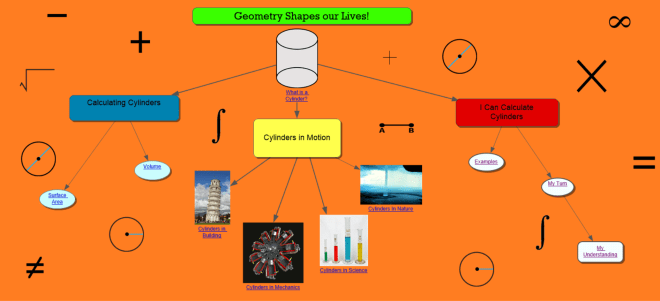
So, this week I had to create a character map for instruction.  I utilized a web site called Kidspiration.  They offer a free 30 day trial.  Though the project wasn’t difficult.  I liked the interactive poster I made last week better.  I did try a second thing with this project.  I included a survey on the map for students to comment on how they felt about the assignment.  I might have gone a little crazy with the math symbols in the background.

charactermap.png

INTERACTIVE POSTERS

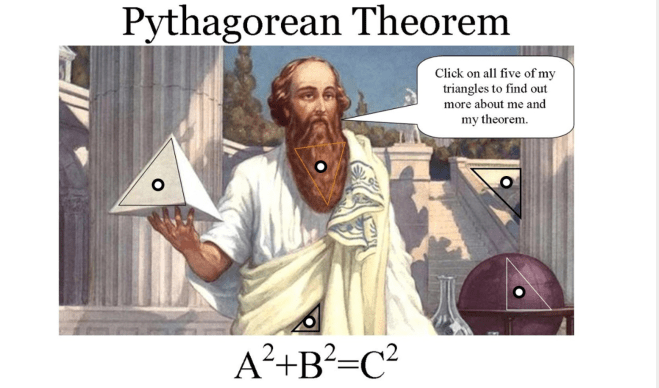
So I had the opportunity to work on an interactive poster for my technology course.  I liked doing this more than the wiki page.  What I  thought was good about the interactive poster is that you can control what your students are looking at on line by have the entire lesson in one place.  What a great way to set up if you know you are having a sub coming in for you.  Your plan is all in one place.  I wish I could have made some items animated but that is probably outside the scope of the free subscription.  I utilized a site called Thinglink.  If you want to look at my first attempt at putting a lesson in an interactive poster, please let me know what you think.  This lesson is for math.  Click o this link to enjoy finding out about the Pythagorean Theorem!!!

Pyh theorem.PNG


GOOGLE ROCKS – LITERALLY!

Last week I had the opportunity to work on a Wiki page.  Wiki pages are a convenient and organized method for tracking information for your classroom.  A teacher can store resources for their students such as study guides or homework assignments, or they can allow students to store and organize resources for research.  Though the free Wiki pages are an awesome resource, I was assigned a task of looking at other teaching resources to report about on my Wiki page.  One of the sources I looked at was Google Earth.  Google earth is a satellite based program developed in the late 1990’s which allows users to navigate to coordinates, addresses, cities and landscapes.  The satellite images are not limited to earths surface.  In fact, Google Earth has continued to expanded over the last 20 years with coverage of the Moon, Mars,https://www.youtube.com/watch?v=LeG0g9a8-0M the ocean https://www.youtube.com/watch?v=GoR0NSp-d2Q and the stars.  Usage of Google Earth exploded in 2003 when CNN used the program to track the Iraq war for millions of American viewers.   Public demand for real time information is skyrocketing.  Google’s real time tracking and historical images makes it a relevant resource for scientists, ecologist and teachers.

For teachers Google Earth can be utilized to meet the social studies common core standards of understanding global and climate change.  The USA National Phrenology Network has a website which utilizes Google Earth to monitor the impact of climate change on plants and animals.  They provide training and resource materials for students, educators, and non-profit groups.  USGS scientists offer videos series to students on climate change in conjunction with research based on satellite images of various locations in the US and other global locations.  Students can view changes tracked over time to learn how to read maps and solve problems which have risen over time due to human activity and weather related phenomenon.   Students can listen to podcasts that cover issues such as the carbon cycle and the difference between climate and weather.  They can learn how climate change causes the El Nino and La Nina effects in the oceans.  Images are available of Glacier Parks from the past in comparison with the present which show the effects of global warming and how farming and settlement has changed our landscape.  the formation of deserts.  Students can see how volcanoes and gases contribute to changes in the atmosphere.  Students can see the contrasting images of how greenhouse gases change the air and water.   NASA’s cooperation with Google allows students can see real time discoveries in our solar system and on planets.  For middle school students, USGS offers students an opportunity to learn how to monitor plant and animal phrenology, how biologist use satellite radio tags to track behavior and movement of sea inhabitants as well as tracking the Mojave Desert Tortoises.   

Click on this link to explore different lesson plans that utilize Google Earth

https://www.usgs.gov/science-support/osqi/yes/resources-teachers/grade-9-12-global-change

MY FAVORITE MATH SITE

One of my favorite educational sites is Which One Doesn’t Belong.   The site poses sets of four numbers, four graphs or four pictures.  Students look at the four numbers and try to find a reason why one of the numbers doesn’t belong in the group based on mathematical principals.  In truth, there is a way to mathematically justify any of the numbers.  It is a great method to get students to think about math in a fun way.

TOO MUCH TIME

So I have been fighting for over two hours to get this site to let me add other sites to follow.  I found the widget button and the instructions say to hit “shift” “click” to edit them.  Assuming “Click” is the mouse button it doesn’t work.

Extremely frustrated and NOT happy by any means